Smart Email Verifier (SEV) - What We Built
Published March 5, 2026
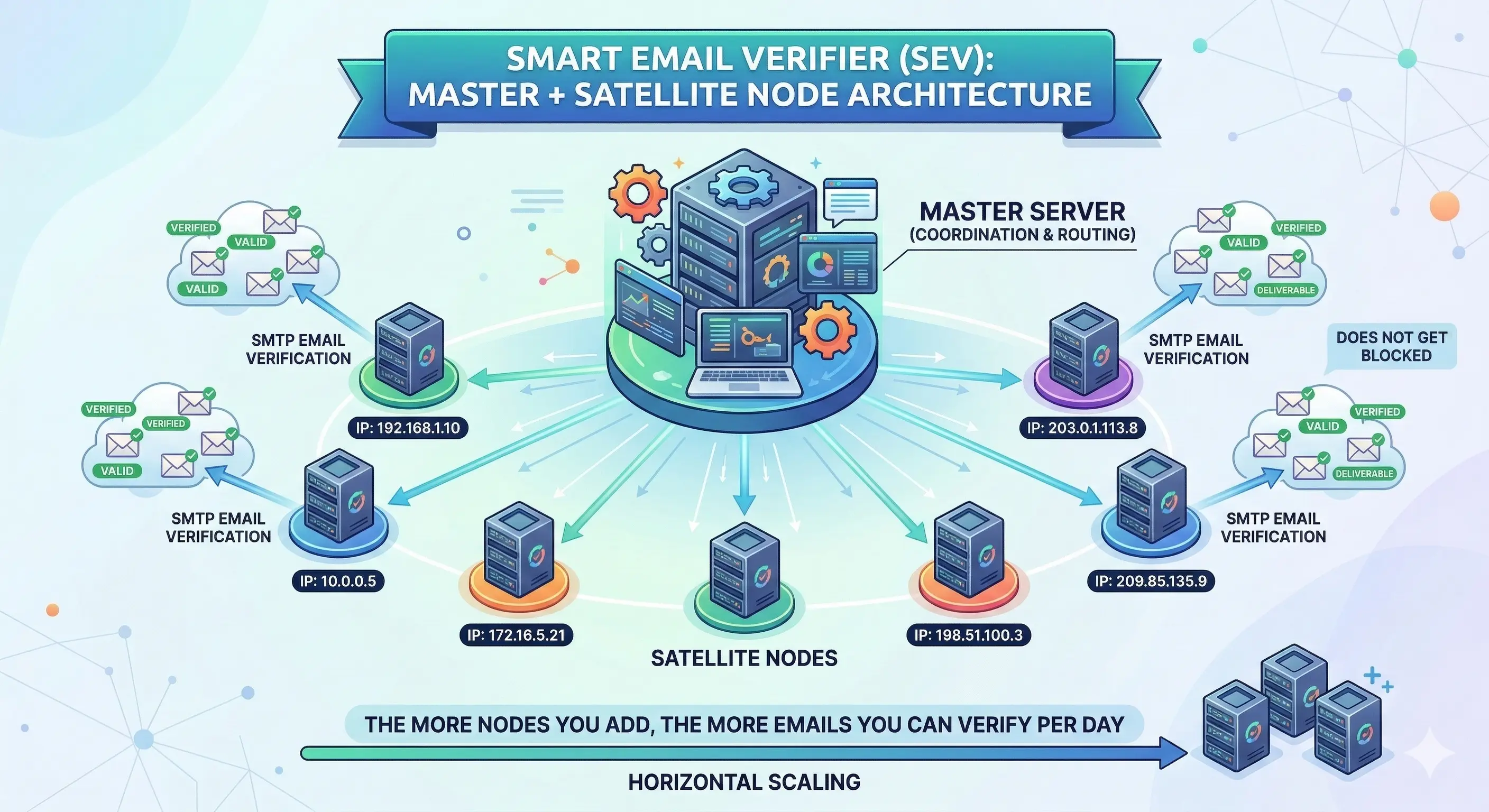
Email verification sounds deceptively simple - ping a mailbox, get an answer. In reality, every major provider actively fights verification traffic with rate limits, IP bans, and silent rejections. This post explains the architecture we built inside Smart Email Verifier (SEV) to solve that problem at scale.
🏗️ Core Architecture
Smart Email Verifier uses a master + satellite node architecture. The master server coordinates jobs and handles routing, while satellite nodes (each on a different IP address) do the actual SMTP email verification. This allows horizontal scaling - the more nodes you add, the more emails you can verify per day without getting blocked.
How Email Verification Works
Each email goes through a layered verification pipeline:
- Syntax Check - is it a valid email format?
- MX Record Lookup - does the domain have mail servers?
- Provider Detection - Gmail, Outlook, BT, TalkTalk, Yahoo, AOL, etc.
- Provider-Specific SMTP Session - direct TCP connection to port 25 of the mail server, simulating a real email delivery to check if the mailbox exists
- Social Presence Fallback - if SMTP is blocked, we check Gravatar, Microsoft Live, and Dropbox for account existence. A confirmed match returns Valid, but no match never means Invalid.
- Result - Valid, Invalid, Catch-All, Unknown, Disposable, Role-Based, etc.
🔄 4-Tier Retry Queue System
When a provider rate-limits or blocks a verification attempt, the email doesn't fail - it enters a multi-tier cooldown queue:
| Tier | Delay | Notes |
|---|---|---|
| Tier 1 | 2 min (Gmail: 5m, Outlook: 15m) | First retry |
| Tier 2 | 1 hour | Extended cooldown |
| Tier 3 | 24 hours | Day cooldown |
| Tier 4 | 48 hours | Final attempt |
| Max reached | - | Accepted as Unknown |
🌐 IP-Block Detection & Smart Node Routing
When a satellite node's IP is blocked by a provider (BT, TalkTalk, Gmail, etc.), the system automatically routes those emails to the next available node with a different IP - without any manual intervention.
How it works:
- When ≥50% of emails for the same provider domain come back Unknown from one node → the system detects an IP block
- Those emails are immediately re-queued back to pending with a retry counter stamp (ip-block-retry:N)
- The next available node picks them up and tries with its own IP
- This chains through ALL available nodes before accepting a genuine Unknown
- With 10 nodes: every email gets tried on up to 10 different IPs
Smart Satellite Routing (Master Side):
- When the master server itself gets rate-limited, it immediately offloads emails to available satellite nodes instead of queuing them for hours
📊 Reliability Scoring System
Each satellite node has a Reliability Score (0–100) that automatically tracks its health:
- Score drops by 15 when >60% of a batch returns Unknown (node may be blocked)
- Score rises by 5 when <20% Unknown (node performing well)
- Below 40: Warning shown in dashboard
- Below 30: Node automatically excluded from all verification work (probation mode)
- Rate-limited results are excluded from scoring - being blocked by TalkTalk doesn't unfairly punish a healthy node
- Manual Reset button added - one click resets score to 100% so you can bring a node back immediately
📤 Streaming File Upload System
For large CSV files (100k–1M+ emails):
- Files are streamed line-by-line instead of loaded into memory - prevents server crashes
- Validation is done during the stream (sample of first 1,000 rows checked)
- File size limits enforced before upload begins
- If upload fails at any stage, no "Failed" card is created on the dashboard
- Worker processes files in streaming batches - constant memory footprint regardless of file size
🛰️ Satellite Node Management Features
Features available in the Satellites dashboard:
| Feature | What it does |
|---|---|
| Reset Reliability | Reset a node's score to 100% with one click |
| Check Port 25 | Test if port 25 is open on the node's IP (from the master side), both when adding a new node and on existing nodes |
| Active Blocks Badge | Shows which providers have recently blocked a node's IP |
| Provider Health Stats | Per-node success rate breakdown by provider (Gmail, Outlook, BT, TalkTalk...) |
| Rotation System | Automatically rotate which node handles verification to distribute load and IP reputation |
| Daily Limits | Set max emails per day per node to control IP reputation |
| Pause/Resume | Instantly pause any node without losing queued work |
🔬 Provider-Specific Verification
Special handling built for the hardest-to-verify providers:
| Provider | Method |
|---|---|
| Yahoo / AOL | Browser fingerprint session simulation (no direct SMTP) |
| Gmail | SMTP with strict cooldown management |
| Outlook / Hotmail | Microsoft GetCredentialType API + SMTP |
| Microsoft 365 | Business tenant detection + SMTP |
🔒 Key Design Principles
- No false negatives is the priority - it's better to return Unknown than to incorrectly mark a real email as Invalid
- Social presence = positive signal only - finding a Microsoft/Gravatar/Dropbox account confirms Valid, but NOT finding one never means Invalid
- IP reputation protection - batch limits, delays between batches, provider-specific cooldowns all designed to keep node IPs clean
- Horizontal scaling - adding more nodes linearly increases throughput and reduces Unknown rates
SEV is built for teams who need accurate, large-scale email verification without manually managing IP blocks or babysitting nodes. If you're dealing with high Unknown rates or getting blocked by providers, give SEV a try.